AUTOMATIZA_LAB

Modbus RTU calculator

Four tools in one: build a request with its CRC, read a frame you captured, calculate the CRC16 of any byte sequence and convert the manual's numbering (40001) to the address that travels on the wire.

The loaded values are examples: replace them with your device's. Everything is calculated in your browser; nothing is sent anywhere.

If your manual says 40001, use the “Manual address” tab to convert it.

Frame ready to send

01 03 00 00 00 02 C4 0B

8 bytes

FieldHexMeaning
Slave address011
Function0303 · Read holding registers
Starting address00 000
Quantity00 022
CRC16 (low byte first)C4 0B

What each tab is for

Build frame
Pick slave, function, address and quantity and get the bytes ready with the CRC, broken down field by field. Useful to test a device from a serial terminal or to compare with what your software sends.
Read frame
Paste the bytes you captured with an analyzer or a USB-RS485 converter. It checks the CRC, splits the fields, explains exceptions and converts registers to signed and unsigned integers, and to 32-bit and float with both word orders.
CRC16
Calculates the CRC of any byte sequence and gives you the full frame with the CRC in the right order (low byte first).
Manual address
Converts 40001 or 30010 style numbering to the frame's 0-based address, and tells you which table it is and with which functions it is read and written.

How the Modbus CRC16 is calculated

The Modbus RTU CRC is a 16-bit CRC with polynomial 0xA001 (0x8005 reflected) and initial value 0xFFFF. It is calculated over every byte of the frame except the CRC itself and sent low byte first: that is why the CRC 0x0BC4 travels as C4 0B.

The functions on this page were checked against the examples published in the Modbus specification (for instance, reading 3 registers from slave 17 starting at address 107 gives 11 03 00 6B 00 03 76 87).

What it does and does not do

  • It covers Modbus RTU only, with functions 01, 02, 03, 04, 05, 06, 15 and 16. It is not Modbus TCP (which has no CRC and does not use the slave address in the same way) nor Modbus ASCII.
  • It does not talk to any device: it builds and analyzes bytes. To send them you need a USB-RS485 converter and a Modbus query program or a serial terminal.
  • It does not know what each register in your device means: the manufacturer's manual says so. Registers are shown as numbers; you apply any scaling (for example tenths of a degree) yourself.
  • A plain number without a prefix in the address tab is ambiguous between base 0 and base 1; choose the one your manual uses and test with a value you know.

To understand frames in depth

Frequently asked questions

How do I calculate the CRC of a Modbus RTU frame?

Paste the frame bytes without the CRC into the CRC16 tab. The tool returns the two CRC bytes in the order they are sent (low byte first) and the full frame ready to copy.

Why does the CRC look “backwards”?

Because Modbus RTU sends the CRC's low byte first. The value 0x0BC4, for example, travels as C4 0B. The calculator already shows it in sending order.

Is the manual's 40001 address 40001 in the frame?

No. 40001 is manual numbering: the prefix 4 marks holding registers and the 1 is the first position, which travels in the frame as address 0. The “Manual address” tab does the conversion.

What does a wrong CRC mean?

That the received bytes do not match the calculated CRC: the frame arrived damaged (noise, swapped A/B polarity, different speed or parity) or was copied wrongly. If the device never answers, start by checking the wiring and serial settings.

How do I read a 32-bit value or a float?

It takes two consecutive registers and manufacturers do not agree on the order. The “Read frame” tab shows both variants (ABCD and CDAB, the latter called word swap) so you can see which one gives a sensible number.

Is anything I type sent to a server?

No. Calculations run in your browser with JavaScript; no data leaves your computer.

Hardware to test your frames

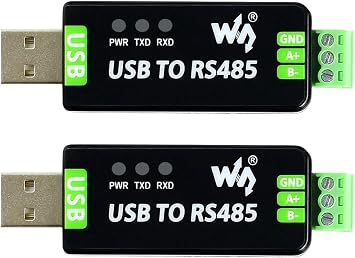
#4Waveshare Industrial USB to RS485 Converter (2 units)

Waveshare Industrial USB to RS485 Converter (2 units)

USBFT232RL2 units
4.6 · 77 reviews

Unlike the RS232/485/422-to-Ethernet gateway already in this ranking, this is a simple USB-to-RS485 converter — it plugs directly into a PC/laptop's USB port to configure, program, or monitor an RS485 bus from a computer, not to bridge to an Ethernet network. Uses the FT232RL chipset (a recognized one, not a generic clone) plus an SP485EEN transceiver, with real overvoltage (TVS) and ESD protection — something cheaper options of this type often skip. Comes as 2 units, useful if you need one for the shop and one as a spare.

#26PUSR DR302 — Modbus RTU to Modbus TCP Gateway, DIN Rail

PUSR DR302 — Modbus RTU to Modbus TCP Gateway, DIN Rail

Modbus RTU/TCPRS485DIN rail
4.5 · 44 reviews

Converts Modbus RTU (over RS485) to Modbus TCP over Ethernet, DIN-rail mounted — it's an alternative from another brand (PUSR) to the Waveshare gateways in this ranking, and cheaper. Supports TCP server/client mode, UDP server/client, and virtual COM. Has considerably fewer reviews than the catalog's most popular products (44), though it's an "Amazon's Choice" in its category — this niche of Modbus gateways on Amazon generally has fewer reviews compared to mass-consumer products.

#1
🏆 Best seller
Waveshare RS232/485/422 to Ethernet Gateway (PoE)

Waveshare RS232/485/422 to Ethernet Gateway (PoE)

RS485/ModbusPoEDIN rail
4.2 · 133 reviews

Supports all three serial standards (RS232/485/422) on one device, so it works for both old instruments with an RS232 port and multi-device RS485 buses. PoE power is a real plus in installations where there's no outlet near the panel — a single Ethernet cable carries both data and power. Confirm whether your Modbus master needs TCP Server or Client mode before buying; the mode is set in software, it doesn't come fixed from the factory.

#28
⭐ Top rated
Waveshare Modbus RTU Relay Module 8 Channels (RS485, Industrial)

Waveshare Modbus RTU Relay Module 8 Channels (RS485, Industrial)

8 channelsRS485 Modbus RTUOptical isolation
4.8 · 28 reviews

Same family as the 16- and 32-channel modules in this ranking (optical, magnetic and TVS isolation, relay rated up to 10A 250VAC/30VDC), but the smallest version of the line — for small installations where neither 16 nor 32 channels make sense. It is the only one of the three with real reviews on Amazon (4.8 stars, 28 reviews). The listing does not state the module's supply voltage range (other Waveshare modules in this family use DC 7-36V) — worth confirming with the seller before buying if your installation has a fixed power source.

Affiliate disclosure: AutomatizaLab is a participant in the Amazon Services LLC Associates Program. We earn a commission on qualifying purchases made through our links, at no extra cost to you. Prices shown are reference prices — the actual price is only confirmed on Amazon.